Build a marketing agent in n8n with analytics, web search, and AI visibility testing
Most marketing automation moves data between apps. Schedule a report, format it, send it. This is an AI agent that actually thinks about your marketing, pulls your analytics, checks what competitors are doing, tests whether AI assistants even know you exist, and proposes what to do next. It runs weekly, reports to Slack, and you can @mention it anytime to ask follow-up questions.
I built it in n8n using MCP to connect web analytics, web search, and web scraping directly to a Claude agent. Once an AI can reach for all of them in one conversation, it stops being a reporting tool and starts making decisions.
What the agent does
The agent runs a three-step cycle:
Sense pulls traffic data via your analytics MCP (visitors, top pages, sources, events, signups), compares this week to last week, and flags anything unusual.
Maintain searches the web for mentions of your product, checks competitor activity with source URLs, and tests whether ChatGPT and Perplexity mention you when someone asks about your category. That last part hits their actual APIs, it's not guesswork.
Ideate proposes up to three marketing actions grounded in the data from the first two steps. Each one includes what to do, why, and an effort estimate.
The report lands in Slack. Between runs, @mention the bot to ask follow-ups using the same tools.
How it fits together
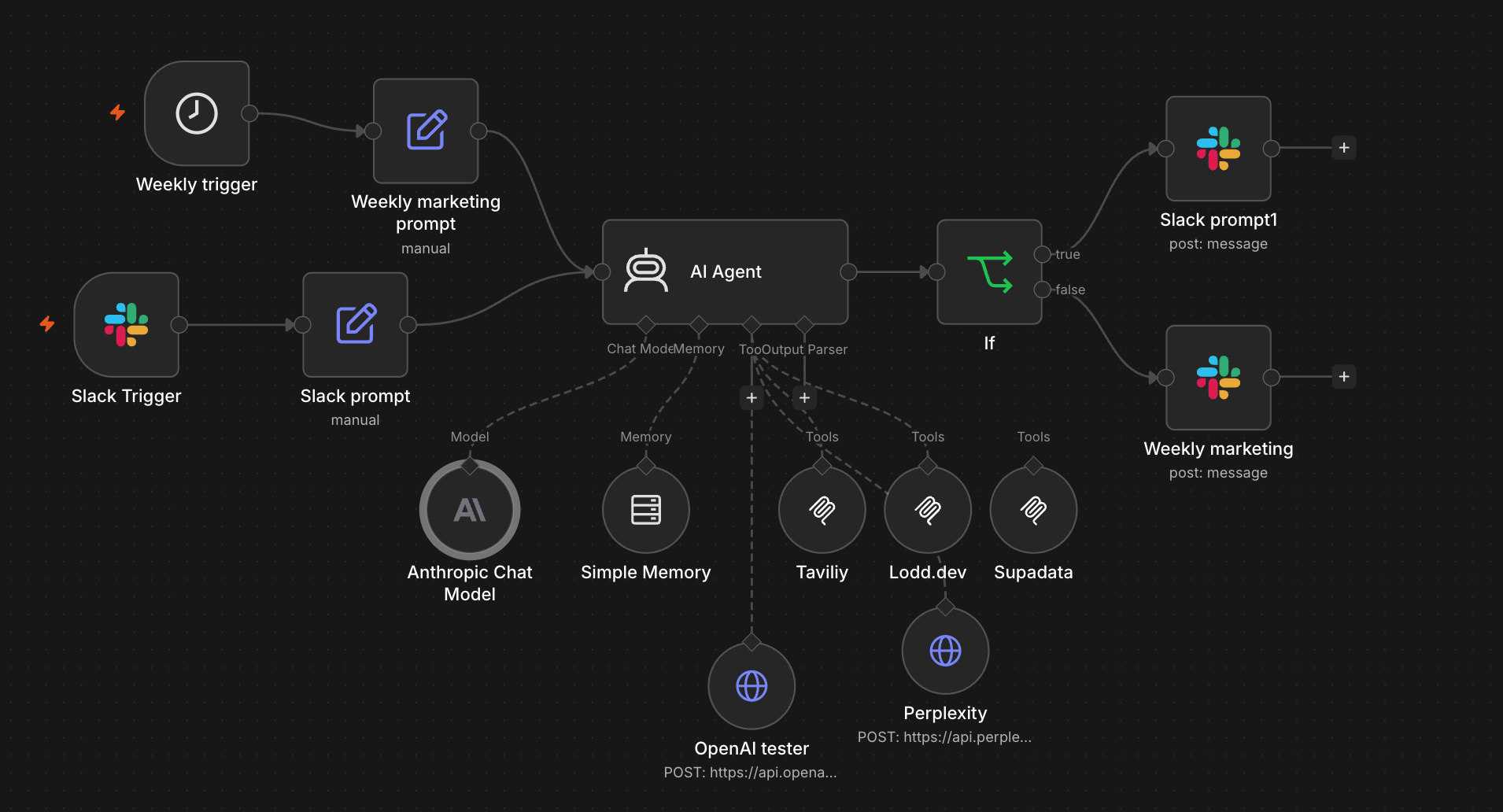
Two triggers feed one AI Agent:
| Path | Trigger | Input | Output |
|---|---|---|---|
| Conversational | Slack @mention | Your question | Reply in thread |
| Scheduled | Weekly cron | Marketing prompt | Post to channel |
The AI Agent has six tools:
| Tool | Type | What it gives the agent |
|---|---|---|
| Lodd | MCP | Web analytics: traffic, pages, sources, funnels, events, sessions |
| Tavily | MCP | Web search and research |
| Supadata | MCP | Web scraping and YouTube transcripts |
| OpenAI | HTTP Request | Asks ChatGPT your visibility question |
| Perplexity | HTTP Request | Asks Perplexity the same question |
| Buffer Memory | Built-in | Remembers the last 10 interactions |
Connect the MCP tools
n8n's MCP Client node connects to any MCP server over HTTP. Add three to the AI Agent's Tool input:
Lodd — 42 analytics tools in one connection.
URL: https://api.lodd.dev/mcp
Auth: Bearer (your Lodd API key)
Tavily — web search and research.
URL: https://mcp.tavily.com/mcp/?tavilyApiKey=YOUR_KEY
Auth: none (key in URL)
Supadata — web scraping, site mapping, transcript extraction.
URL: https://api.supadata.ai/mcp
Auth: Header (X-API-Key: YOUR_KEY)
Two minutes each. The agent discovers available tools automatically once connected.
AI visibility testing
Instead of guessing whether AI assistants know about your product, you ask them.
Add two HTTP Request Tool nodes to the AI Agent's Tool input. Each makes a POST to a chat completions API with a hardcoded question about your category:
OpenAI:
{
  "model": "gpt-5.4-mini",
  "messages": [{
    "role": "user",
    "content": "What [your category] tools are available? List specific products."
  }]
}
Perplexity:
{
  "model": "sonar",
  "messages": [{
    "role": "user",
    "content": "What [your category] tools are available? List specific products."
  }]
}
The agent calls these during the Maintain step and reports exactly what each one said. When I first ran it for my own product, GPT listed ten competitors and I wasn't mentioned. That's the kind of thing you want to know, and now it checks every week automatically.
Weekly prompt
A Schedule Trigger fires weekly. An Edit Fields node sets the prompt:
You are a marketing agent for [your product]. Run the following cycle:

SENSE: Pull analytics for the last 7 days. Compare to the previous
7 days. Check pages, sources, events. Flag changes over 20%.

MAINTAIN:
- Search the web for mentions in the last week. Include source URLs.
- Use the OpenAI tool to check if your product appears when asked
  about your category. Report exactly what it said.
- Use the Perplexity tool for the same check.
- For any competitor claim, include the source URL or mark as UNVERIFIED.

IDEATE: Propose up to 3 actions. What to do, why (grounded in data),
effort estimate (quick/medium/significant).

Rules: Lead with findings, not process. Source URLs for every claim.
Under 500 words.
The Edit Fields node also sets source: schedule and channel: YOUR_CHANNEL_ID for routing later.
Slack integration
A Slack Trigger listens for @mentions of the bot. An Edit Fields node cleans the input:
chatInput: {{ $json.text.replace(/<@[A-Z0-9]+>\s*/g, '') }}
source: slack
channel: {{ $json.channel }}
ts: {{ $json.ts }}
Both paths feed chatInput to the same AI Agent. After the agent responds, an IF node routes the output:
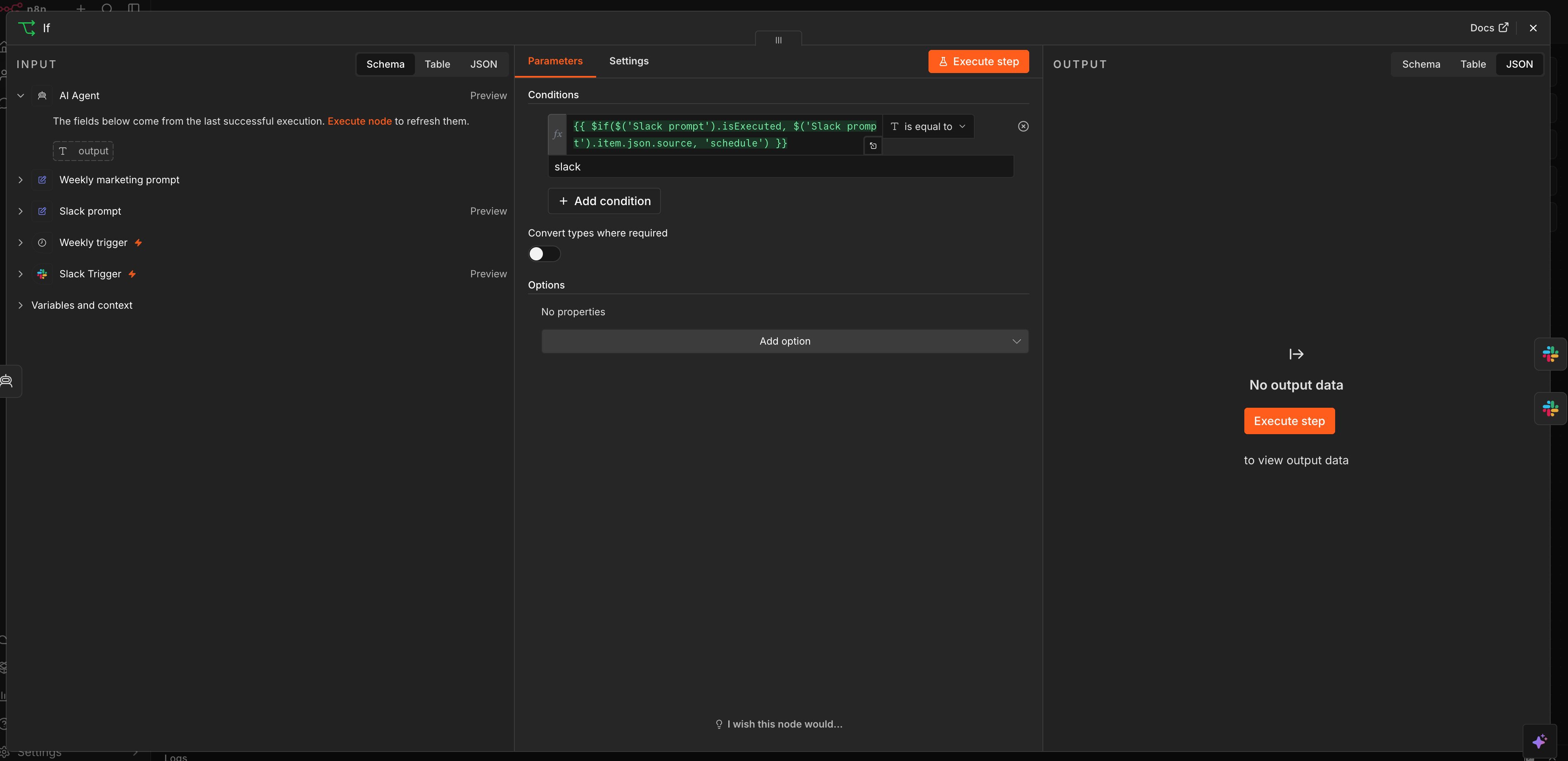
{{ $if($('Slack prompt').isExecuted, $('Slack prompt').item.json.source, 'schedule') }}If the source is slack, the response goes to a Slack node that replies in the original thread. Otherwise it posts the weekly report to your marketing channel.
Setting up the Slack app
Create an app at api.slack.com/apps with these bot token scopes:
app_mentions:readchannels:historychannels:readchat:write
Under Event Subscriptions, paste your n8n production webhook URL and subscribe to app_mention. Install the app, invite the bot to your channel, and you're live.
What the output looks like
A real weekly report from this workflow (anonymised):
Sense: 50 visitors, 96 page views. Reddit traffic averaging 910s session duration, the highest quality source by far. 4 signups on 50 visitors (8% conversion). Traffic down 30% from the previous week, likely post-launch decay.
Maintain: ChatGPT lists six competitors when asked about the category. Your product not mentioned. Perplexity cites three, also no mention. One competitor published a blog post positioning against your approach this week (source URL included).
Ideate: (1) Submit to directories and registries to close the AI visibility gap, quick. (2) Write a response to the competitor's framing before it sticks, medium. (3) Cross-post your launch to two relevant subreddits, quick.
Between reports, @mention the bot: "what drove the traffic spike on Tuesday?" or "compare our blog performance to last month" and it pulls the data live.
Import the workflow
Download the workflow JSON and import it into n8n. You'll need to add your own credentials for each service.
Accounts needed:
- Lodd — web analytics (free tier available)
- Tavily — web search
- Supadata — web scraping
- OpenAI and Perplexity API keys for visibility testing
- A Slack workspace with a bot app
The REST API version of this workflow (for deterministic reports without an AI agent) is covered in giving your n8n workflows real-time analytics data.